 Putby
Canning log and pantry inventoryKnow what's on your shelf, and that you canned it right.
Putby is a free canning log and pantry inventory. Log a batch in seconds and it shows the tested process for that food at your altitude: time or pressure, headspace, a botulism check, and the NCHFP source. The pantry counts every jar, says what to eat first and prints labels. In your browser, or on your phone.
- Free, no card
- No account
- 255 NCHFP-tested foods
- Fails closed
- Nine languages
 Already use Putby on your phone? Open your pantry here and choose Connect with your phone, then scan the browser's code from Settings, Putby in your browser.
A jar log in seconds
Food, method, jar size, how many sealed. The process card fills itself in as you type, with the low-acid alert and the source.
A pantry inventory, every jar counted
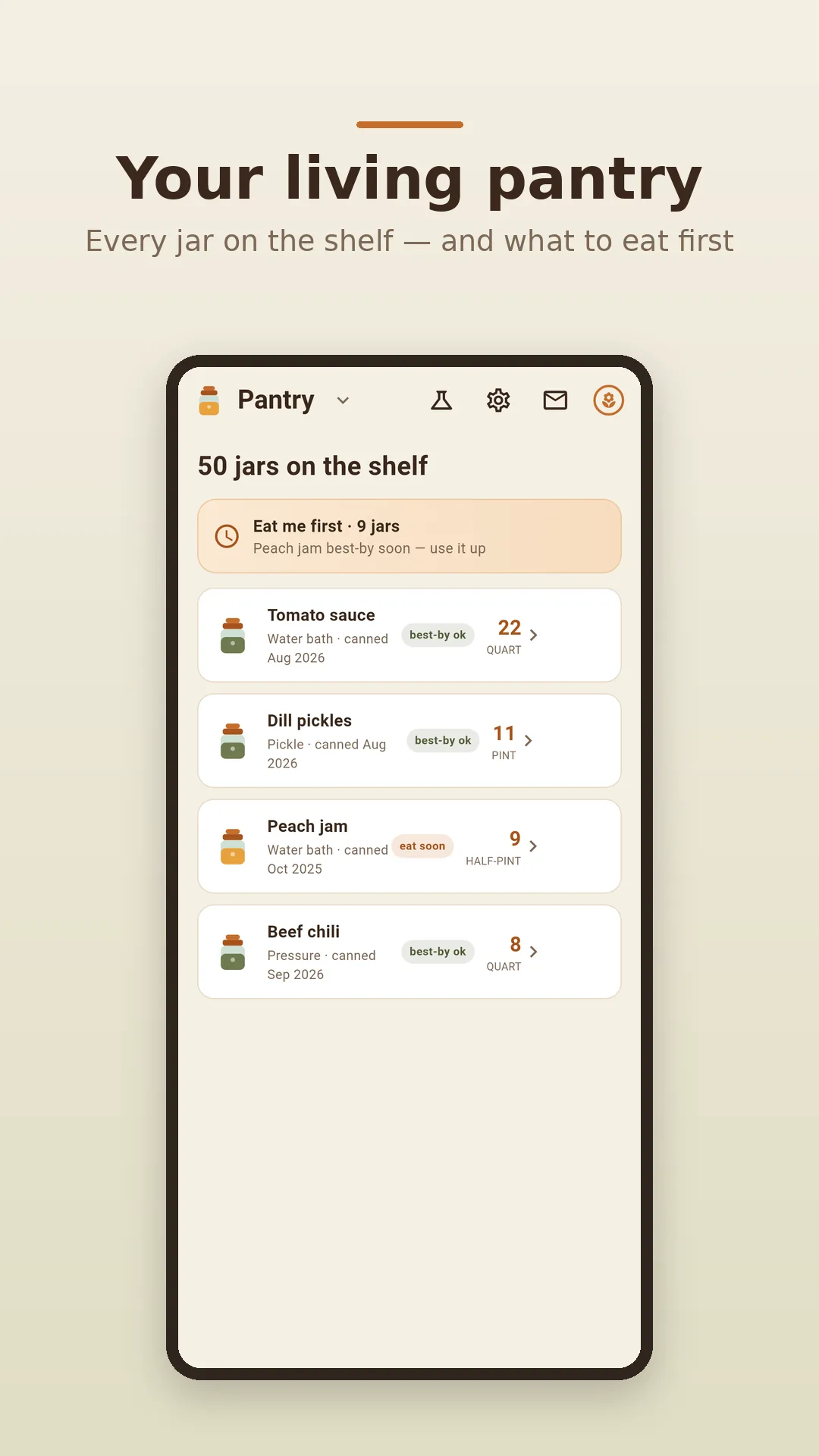
Eat me first, best-by chips, one row per food. Take a jar off the shelf from any phone or browser in the house.
The tested process
255 NCHFP foods, each with its own altitude table and source. No number when none is tested.
Print, peel, done
One label per jar: contents, date, batch, best-by. Avery sheets from the browser, an A4 sheet from the phone.
Safety first
A home canning app that fails closed
Putby is a companion to tested recipes, not a replacement for them. It looks a food up in the same tables the USDA and the National Center for Home Food Preservation publish, and when nothing tested covers what you typed, it says so instead of guessing.
- Low-acid always means pressure. Green beans, corn, carrots, meat: Putby routes them to the pressure canner and shows the botulism check. It will not hand you a water-bath time for them.
- Your altitude, the food's own bands. Water-bath minutes and dial-gauge pressure come from that food's NCHFP altitude table, never a shared rule of thumb.
- Sizes resolve up, never down. No tested quart process? No quart number. Half-gallons are tested for apple and grape juice only.
- Every number names its source and links to the NCHFP page it came from.
- Method
- Pressure canner
- Time
- At your altitude
- Dial gauge
- At your altitude
- Headspace
- As published
Source: USDA Complete Guide to Home Canning, Guide 4 · NCHFP. The numbers appear in the app and the free chart, read from that page.
In your browser
The pantry at your desk. The canning log at the stove.
Putby in a browser is the same free app on a bigger screen: plan the season, look up a process, print a sheet of labels, take a jar off the shelf. It joins the pantry your phone already keeps.
- Open Putby in your browserNo sign-up. Start a pantry here, or join the one on your phone.
- Scan the browser's code with your phoneIn the app: Settings, Putby in your browser, Connect a browser. Or type the code from Settings, Share with family, Show a code.
- One shelf, every screenA jar eaten on the phone is a jar gone in the browser, and the other way round. Two people each taking a jar is two jars.
The browser sells nothing. If your phone has Putby+, connecting with the phone's camera brings it along; if not, the Insights tab says Unlock with Putby+ in the app. The safe-processing reference is never behind either.
Free, no app needed
Canning times by altitude, and labels for the jars
Two things every canner looks up at the kitchen table, as plain pages. They read the same table as the app.
Water bath and pressure canning times
Pick a food, a jar and your altitude. Low-acid foods show the pressure process with the weighted-gauge and dial-gauge rule; every page cites its USDA or NCHFP source and links to it.
Open the canning times chart · every NCHFP foodPrintable canning jar labels
Contents, date, batch and best-by on Avery 5160, 8160, 5163, 8163 or L7160 sheets, straight from the browser. Nothing uploaded.
Print jar labels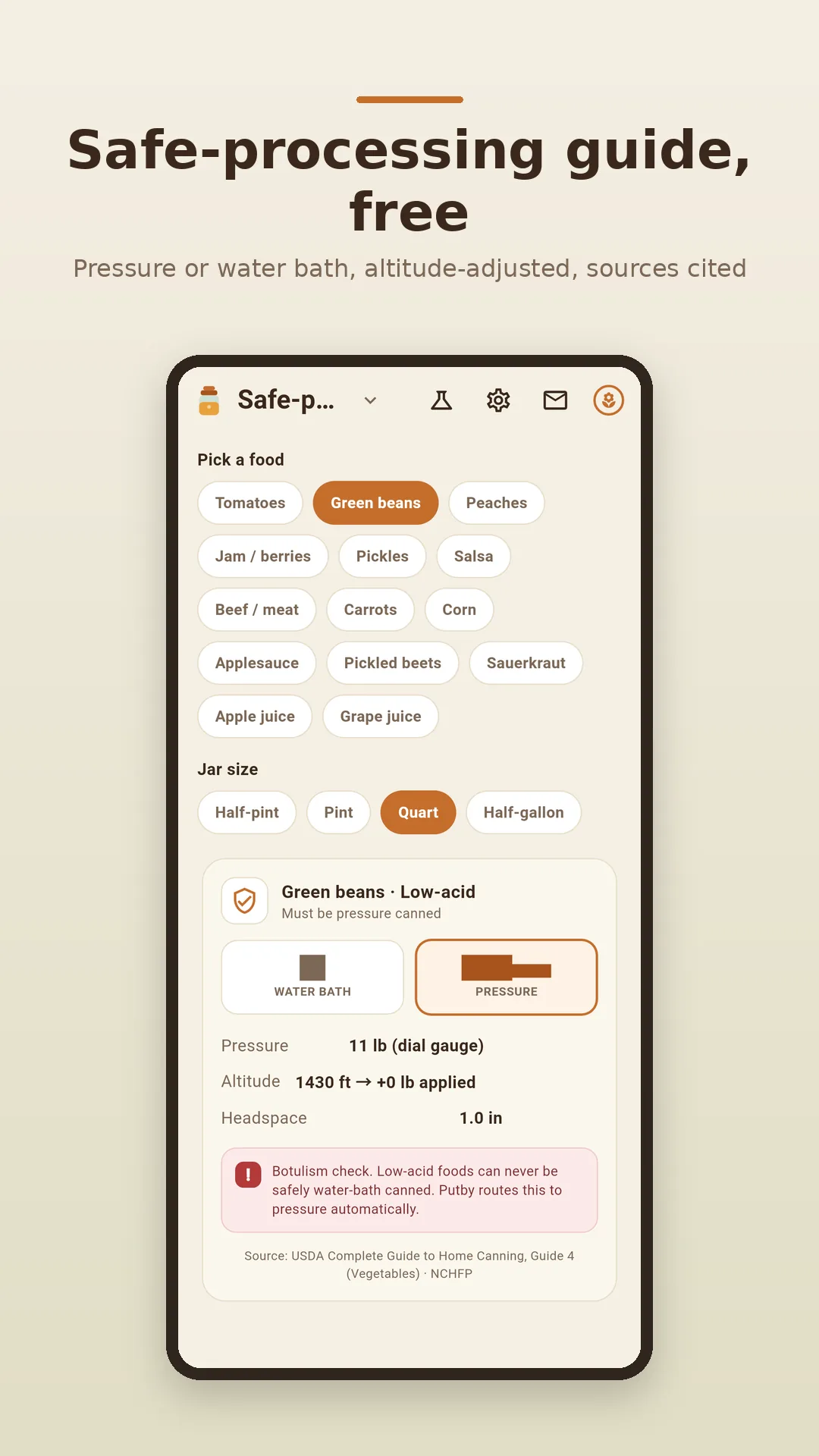
Keep it on your phone
The browser keeps the ledger. The phone is in the kitchen.
Logging happens with wet hands next to the canner, and a jar comes off the shelf in the cellar. Those are the phone's job, and the ferment reminders live there too.
- Log a batch at the stove, offline, no login
- Ferments and pickles with day counts, burp and taste-check reminders
- Share with family by QR code, so the whole house takes from one shelf
- Label sheet and CSV export from the share icon
- Dark cellar mode, large text, high contrast
- Nine languages
Putby+ adds insight from your own batches: money put by, over-production, your preserving season in words, and the next three months planned from what you put up last year. A subscription or a one-time purchase at the store's price. Safety is never part of it.
🎁 A free month for you and a friend
Invite a friend from the Putby phone app and you both get 30 days of Putby+, free.
- Install Putby on your phone.
- Open Invite a friend and share your code.
- Got a code from a friend? Enter it under Have an invite code? within 14 days of installing.
Invites are redeemed in the phone app. How invites work
Guides
For people who put food by
- What to record in a canning logA field-by-field checklist: the lines that matter in February, and the ones that don't.
- Home canning pantry inventoryHow to count, organize and rotate jars so nothing gets forgotten at the back.
- How to label home-canned jarsWhat to write, where it goes, and what to do about the lid.
- Canning times by altitudeThe free chart, every food with its source, and the altitude rule explained.
Questions
Before the first batch
Is Putby free?
Yes. The canning log, the pantry, jar labels, ferment timers, CSV export, household sharing and the whole safe-processing reference are free, with no card and no account. Putby+ is an optional purchase in the phone app that adds insight into your own seasons; it never adds safety.
Where do the canning times come from?
From the National Center for Home Food Preservation (NCHFP) and the USDA Complete Guide to Home Canning. Each food carries its own altitude table copied from the published page, and every process Putby shows names its source and links to it. Putby never invents or borrows a time.
Does Putby adjust canning times for my altitude?
Yes. You enter your altitude once; water-bath times and dial-gauge pressures are read from the food's own NCHFP altitude bands. Above the published table, Putby shows no number rather than a guess.
Can I water-bath can green beans or other low-acid foods?
No. Low-acid foods such as green beans, corn, carrots and meat can only be made safe in a pressure canner. Putby routes every low-acid food to pressure and shows a botulism check; it will not give you a water-bath time for them.
What happens when there is no tested process for my jar size?
Putby fails closed: it says no tested process covers that food in that jar and shows no number. Sizes only ever resolve up to the next tested jar, never down. Half-gallons, for example, are tested for apple and grape juice only.
How does the browser see the pantry on my phone?
Open the web app and choose Connect with your phone. In the Putby app, open Settings, Putby in your browser, Connect a browser, and scan the code the browser shows. Or type the code from Settings, Share with family. Either way the browser joins the same household pantry. A jar eaten on either device is one jar off the shelf everywhere. No email, no password.
Can I buy Putby+ on the web?
No. The web sells nothing. Putby+ is bought in the phone app at the store's price, and once your phone has it, connecting the browser with the phone's camera brings Putby+ into the browser too. Free users see Unlock with Putby+ in the app on the Insights tab.
Does Putby print jar labels?
Yes. The app shares an A4 peel-and-stick sheet with one label per jar: contents, date, batch, best-by. The free web label maker prints onto Avery 5160, 8160, 5163, 8163 and L7160 sheets.
Is Putby food-safety certification?
No. Putby is a companion to tested recipes from the USDA, NCHFP, Ball and Bernardin, not a replacement for them and not a certification. Follow a tested recipe; Putby helps you log it, look up its process and keep count.
Put it by. Safely.
Open the pantry in your browser now, or put Putby on the phone that stands next to the canner.